(English / Manual) CSV, Excel, Calc, JSON, XML, TSV simple viewer - Ubuntu 24.04
(Korean) 아래 설명은 영어로 되어 있습니다.
우분투(Ubuntu)용 한국어 설명은 아래 링크를 참고해주세요.
[ Information ]
- Application Name : DSN Viewer (* Application name before change: FileViewer)
- Version : 0.2.4
- Release date : 2026-09-09 [Y-M-D]
[ Description ]
Developed on Ubuntu 24.04,
this is a simple viewer for
CSV (.csv)
Excel (.xlsx, .xls)
OpenDocument Spreadsheet Calc (.ods) : LibreOffice Calc, OpenOffice Calc
JSON (.json)
XML (.xml)
TSV(Tab-Separated Values) (.tsv)
files.
It was developed using pandas + PySide6 / PyQt5 + pyInstaller.
- Qt6 version : pandas + PySide6 + pyInstaller
- Qt5 version : pandas + PyQt5 + pyInstaller
[ Features ]
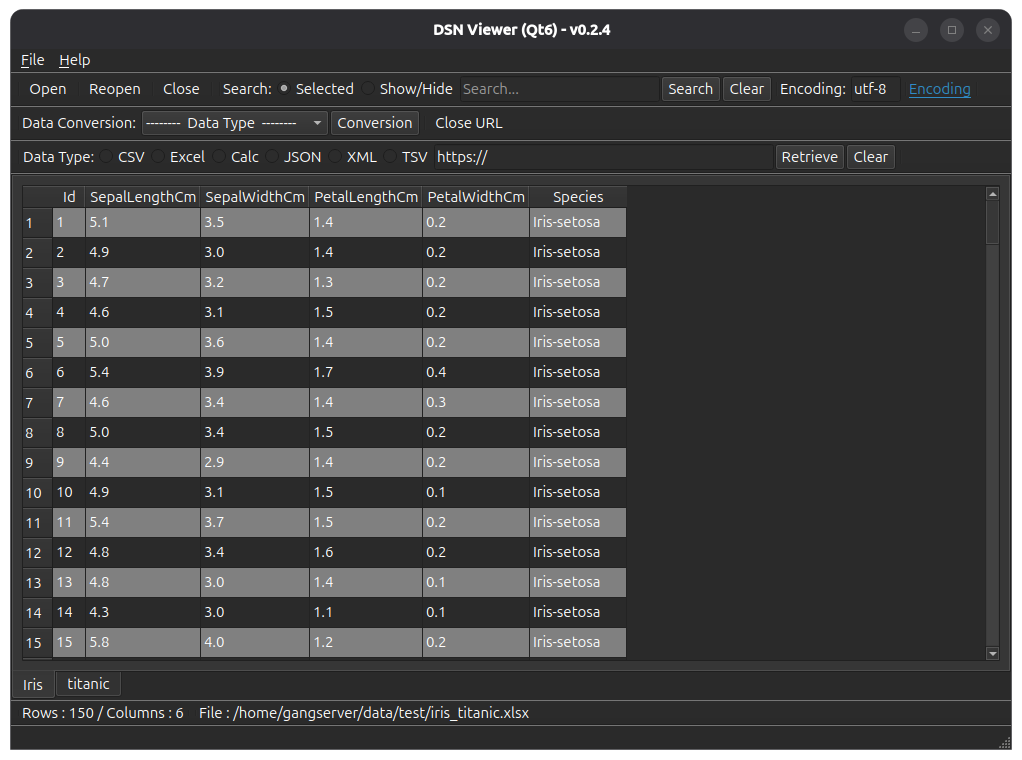
- It reads the file and displays it on the screen in a table format.
- Open local files.
- Open remote files using a URL.
- (Supports local files only; remote files not supported) Convert file formats (e.g., convert an xlsx document to csv).
- Simple search function: Search within an opened file using keywords.
- Supported file extensions : csv, xlsx, xls, ods, json, xml, tsv
[ Download ]
Please refer to the link below for the last version for Ubuntu.
- Debian package version(.deb) / AppImage version / Portable version
(v 0.2.4) http://dasom.net/467
* If you need the last version for Windows, please refer to the link below.
- NSIS installer version / Portable version
(v 0.2.4) http://dasom.net/468
[ Installation - Debian package version(.deb) ]
After running the terminal, change to the downloaded directory
and execute the Debian packaging installation command as follows.
* The display varies as shown below, depending on the Qt version and the application version.
| Qt version | Version | File name |
| Qt6 | 0.2.4 | dsn-viewer-qt6_0.2.4_amd64.deb |
| Qt5 | 0.2.4 | dsn-viewer-qt_0.2.4_amd64.deb |
( Qt6 )
$ sudo dpkg -i dsn-viewer-qt6_0.2.4_amd64.deb
or
$ sudo apt install ./dsn-viewer-qt6_0.2.4_amd64.deb
( Qt5 )
$ sudo dpkg -i dsn-viewer-qt_0.2.4_amd64.deb
or
$ sudo apt install ./dsn-viewer-qt_0.2.4_amd64.deb
[ Run - Debian package version(.deb) ]
Click the installed "DSN Viewer ([Qt version])" app to run it.
( Qt6 )
( Qt5 )
[ Run - AppImage version ]
- Check execution permissions
Please check if the "dsn-viewer-[qt version]-[version]-x86_64.AppImage" file has execute permissions.
If you do not have execute permissions, please run the terminal and add the permissions below.
* The display varies as shown below, depending on the Qt version and the application version.
| Qt version | Version | File name |
| Qt6 | 0.2.4 | dsn-viewer-qt6-0.2.4-x86_64.AppImage |
| Qt5 | 0.2.4 | dsn-viewer-qt-0.2.4-x86_64.AppImage |
( Qt6 )
$ chmod u+x dsn-viewer-qt6-0.2.4-x86_64.AppImage
( Qt5 )
$ chmod u+x dsn-viewer-qt-0.2.4-x86_64.AppImage
- Run
( Qt6 )
$ ./dsn-viewer-qt6-0.2.4-x86_64.AppImage
or
$ ./dsn-viewer-qt6-0.2.4-x86_64.AppImage [File path/File name]
ex) $ ./dsn-viewer-qt6-0.2.4-x86_64.AppImage ~/data/sample.xlsx
( Qt5 )
$ ./dsn-viewer-qt-0.2.4-x86_64.AppImage
or
$ ./dsn-viewer-qt-0.2.4-x86_64.AppImage [File path/File name]
ex) $ ./dsn-viewer-qt-0.2.4-x86_64.AppImage ~/data/sample.xlsx
[ Run - Portable version ]
- Check execution permissions
Please check if the "dsn-viewer-[qt version]" file has execute permissions.
If you do not have execute permissions, please run the terminal and add the permissions below.
( Qt6 )
$ chmod u+x dsn-viewer-qt6
( Qt5 )
$ chmod u+x dsn-viewer-qt
- Run
( Qt6 )
$ ./dsn-viewer-qt6
or
$ ./dsn-viewer-qt6 [File path/File name]
ex) $ ./dsn-viewer-qt6 ~/data/sample.xlsx
( Qt5 )
$ ./dsn-viewer-qt
or
$ ./dsn-viewer-qt [File path/File name]
ex) $ ./dsn-viewer-qt ~/data/sample.xlsx
[ Uninstallation - Debian package version(.deb) ]
After running the terminal, execute the Dabian packaging removal command as follows.
( Qt6 )
$ sudo apt remove dsn-viewer-qt6
( Qt5 )
$ sudo apt remove dsn-viewer-qt
[ Uninstallation - AppImage version / Portable version ]
Delete the downloaded file.
[ Screenshot ]
[ License ]
This program is freeware.
(This program is available for anyone to use for free.)
This program does not warrant against any problems that may occur during use.
This program does not collect or transmit any personal information or data from users.
This program can only be distributed on the following site.
http://dasom.net
https://gangserver.tistory.com