(English) CSV, Excel, Calc, JSON, XML, TSV, HTML simple viewer (v 0.2.5) - Ubuntu 24.04
(Korean) 아래 설명은 영어로 되어 있습니다.
우분투(Ubuntu)용 한국어 설명은 아래 링크를 참고해주세요.
- Ubuntu 24.04 CSV(.csv), Excel(.xlsx, .xls), OpenDocument Spreadsheet Calc(.ods), JSON(.json), XML(.xml), TSV(.tsv), HTML(.html, .htm) simple viewer
* Version : 0.2.5
* Release date : 2026-09-22 [Y-M-D]
- Patch date :
* Starting with version 0.2.0, the Ubuntu version is distributed as a Debian package(.deb).
(e.g., dsn-viewer-[Qt version]_[Version]_amd64.deb)
This is an older version for Ubuntu. For the latest version, please refer to the link below.
- Debian package version(.deb) / AppImage version / Portable version
(v 0.2.7) http://dasom.net/450
* If you need the last version for Windows, please refer to the link below.
- NSIS installer version / Portable version
(v 0.2.7) http://dasom.net/449
This is a CSV, Excel, (LibreOffice/OpenOffice) Calc, JSON, XML, TSV(Tab-Separated Values) and HTML simple viewer developed using (Qt6 version : pandas + PySide6 + pyinstaller), (Qt5 version : pandas + PyQt5 + pyinstaller).
[ Features ]
- It reads the file and displays it on the screen in a table format.
- Open local files.
- Open remote files using a URL.
- (Supports local files only; remote files not supported) Convert file formats (e.g., convert an xlsx document to csv).
- Simple search function: Search within an opened file using keywords.
- Supported file extensions : csv, xlsx, xls, ods, json, xml, tsv, html, htm
* For HTML (.html, .htm) data, only data formatted as tables (using the "<table>" tag) within the HTML file is processed; therefore, data cannot be imported if there are no tables ("<table>" tags).
[ Download ]
Caution! - To prevent spam downloads, the download URL below is changed periodically.
( Qt6 version )
- Debian package version (filename : dsnet-viewer-qt6_0.2.5_amd64.deb / 96MB)
https://drive.google.com/file/d/17Yyh0hmGbAYh3bPMIsmS4SrIukTaOT6A/view?usp=sharing
- AppImage version (filename : dsnet-viewer-qt6-0.2.5-x86_64.AppImage / 97MB)
https://drive.google.com/file/d/10HjXYjI8vgkCwvv1t1HWA387ebcI8TM4/view?usp=sharing
- Portable version (filename : dsnet-viewer-qt6 / 97MB)
https://drive.google.com/file/d/178L7W5IbFObCdzFO8p9BZRH-YJ2x7dCX/view?usp=sharing
( Qt5 version )
- Debian package version (filename : dsnet-viewer-qt_0.2.5_amd64.deb / 80MB)
https://drive.google.com/file/d/1-Zzx9fEhdz2uG_YFGMBsAyjS4p42m_xG/view?usp=sharing
- AppImage version (filename : dsnet-viewer-qt-0.2.5-x86_64.AppImage / 81MB)
https://drive.google.com/file/d/1pO0CGVUjBIjDWJTy5TTBP8HdTajoCur8/view?usp=sharing
- Portable version (filename : dsnet-viewer-qt / 80MB)
https://drive.google.com/file/d/1v7H5mOkPeI4yRgpCl4cNQnS1TSjRViMI/view?usp=sharing
[ Installation - Debian package version(.deb) ]
After running the terminal, change to the downloaded directory
and execute the Debian packaging installation command as follows.
* The display varies as shown below, depending on the Qt version and the application version.
| Qt version | Version | File name |
| Qt6 | 0.2.5 | dsnet-viewer-qt6_0.2.5_amd64.deb |
| Qt5 | 0.2.5 | dsnet-viewer-qt_0.2.5_amd64.deb |
( Qt6 )
$ sudo dpkg -i dsnet-viewer-qt6_0.2.5_amd64.deb
or
$ sudo apt install ./dsnet-viewer-qt6_0.2.5_amd64.deb
( Qt5 )
$ sudo dpkg -i dsnet-viewer-qt_0.2.5_amd64.deb
or
$ sudo apt install ./dsnet-viewer-qt_0.2.5_amd64.deb
[ Run - Debian package version(.deb) ]
Click the installed "DSNet Viewer ([Qt version])" app to run it.
( Qt6 )
( Qt5 )
[ Run - AppImage version ]
- Check execution permissions
Please check if the "dsnet-viewer-[Qt version]-[version]-x86_64.AppImage" file has execute permissions.
If you do not have execute permissions, please run the terminal and add the permissions below.
* The display varies as shown below, depending on the Qt version and the application version.
| Qt version | Version | File name |
| Qt6 | 0.2.5 | dsnet-viewer-qt6-0.2.5-x86_64.AppImage |
| Qt5 | 0.2.5 | dsnet-viewer-qt-0.2.5-x86_64.AppImage |
( Qt6 )
$ chmod u+x dsnet-viewer-qt6-0.2.5-x86_64.AppImage
( Qt5 )
$ chmod u+x dsnet-viewer-qt-0.2.5-x86_64.AppImage
- Run
( Qt6 )
$ ./dsnet-viewer-qt6-0.2.5-x86_64.AppImage
or
$ ./dsnet-viewer-qt6-0.2.5-x86_64.AppImage [File path/File name]
ex.) $ ./dsnet-viewer-qt6-0.2.5-x86_64.AppImage ~/data/sample.xlsx
( Qt5 )
$ ./dsnet-viewer-qt-0.2.5-x86_64.AppImage
or
$ ./dsnet-viewer-qt-0.2.5-x86_64.AppImage [File path/File name]
ex.) $ ./dsnet-viewer-qt-0.2.5-x86_64.AppImage ~/data/sample.xlsx
[ Run - Portable version ]
- Check execution permissions
Please check if the "dsnet-viewer-[qt version]" file has execute permissions.
If you do not have execute permissions, please run the terminal and add the permissions below.
( Qt6 )
$ chmod u+x dsnet-viewer-qt6
( Qt5 )
$ chmod u+x dsnet-viewer-qt
- Run
( Qt6 )
$ ./dsnet-viewer-qt6
or
$ ./dsnet-viewer-qt6 [File path/File name]
ex.) $ ./dsnet-viewer-qt6 ~/data/sample.xlsx
( Qt5 )
$ ./dsnet-viewer-qt
or
$ ./dsnet-viewer-qt [File path/File name]
ex.) $ ./dsnet-viewer-qt ~/data/sample.xlsx
[ Uninstallation - Debian package version(.deb) ]
After running the terminal, execute the Dabian packaging removal command as follows.
( Qt6 )
$ sudo apt remove dsnet-viewer-qt6
( Qt5 )
$ sudo apt remove dsnet-viewer-qt
[ Uninstallation - AppImage version / Portable version ]
Delete the downloaded file.
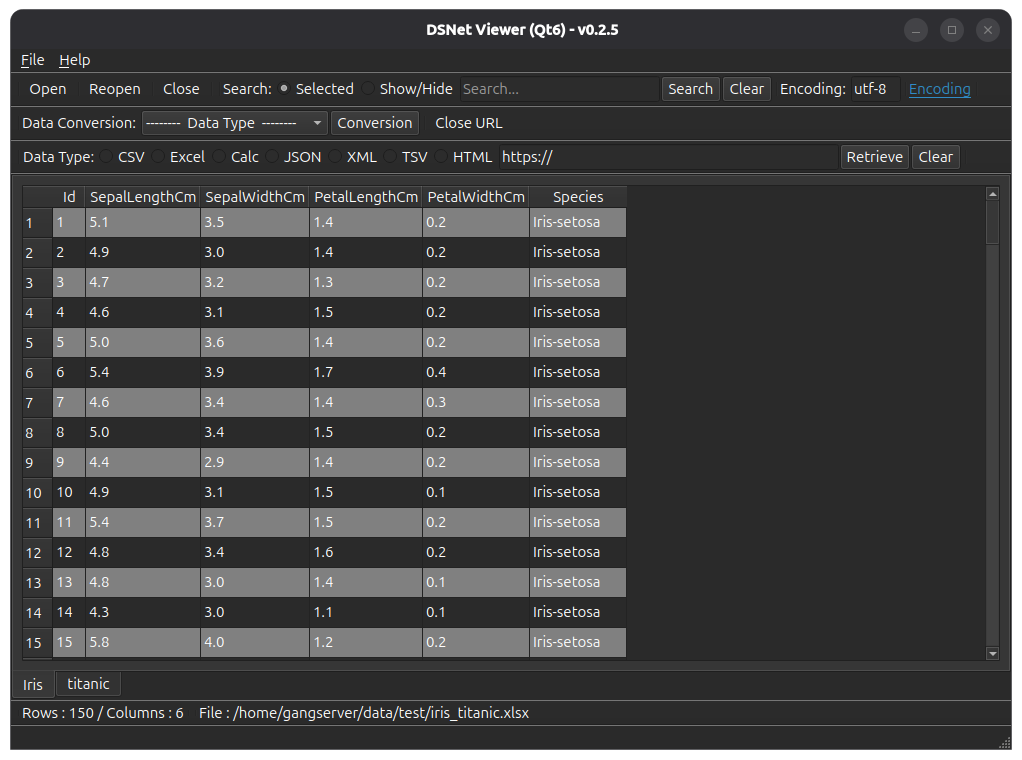
[ Running screen ] - Screen when OS dark theme is applied
* The first line of data is used as the column header name.
( Qt6 )
( Qt5 )

[ File hash check ]
File SHA256 hash value :
( Qt6 )
- dsnet-viewer-qt6_0.2.5_amd64.deb :
787e316ee8e65f98c0ff9afc7b5a515484a50f452c6667775166f6e15ace623c
- dsnet-viewer-qt6-0.2.5-x86_64.AppImage
78a6776e810105b327ee952a7cb645d7df29bc44300ff39bd16e260e50666655
- dsnet-viewer-qt6 :
b9f2638505d736ae832d0d72090f70268e0919dc0ad1a1d7633a52d4974ddc14
( Qt5 )
- dsnet-viewer-qt_0.2.5_amd64.deb :
abf2d989b8e47d9843055936ac78dcc1fc453b470cdd73d6c529b2e5fab65325
- dsnet-viewer-qt-0.2.5-x86_64.AppImage
ec3668fc2061d8fde50b999073a98b4a8eb3cef3dd9a155df548b13a21b2a23b
- dsnet-viewer-qt :
4544047d70000bf46e63a514fd48858182f355be5fffb3e3fe32f81d66cbe52d
* To check the SHA256 hash of a file in Ubuntu,
use the Terminal command sha256sum <file_path>
$ sha256sum dsnet-viewer-qt6_0.2.5_amd64.deb
787e316ee8e65f98c0ff9afc7b5a515484a50f452c6667775166f6e15ace623c dsnet-viewer-qt6_0.2.5_amd64.deb
[ Development environment ]
(* Bold text indicates updated modules.)
python : 3.12.x
pandas : 3.0.6
python-calamine : 0.8.2
lxml : 6.1.3
xlsxwriter : 3.2.9
openpyxl : 3.1.5
xlrd : 2.0.2
odfpy : 1.4.1
pyinstaller : 6.22.3
(Added)
beautifulsoup4 : 4.15.0
html5lib : 1.1
( Qt6 )
PySide6 : 6.11.2
( Qt5 )
PyQt5 : 5.15.11
[ License ]
This program is freeware.
(This program is available for anyone to use for free.)
This program does not warrant against any problems that may occur during use.
This program does not collect or transmit any personal information or data from users.
This program can only be distributed on the following site.
http://dasom.net
https://gangserver.tistory.com
[ Update information ]
0.2.5 (2026-09-22 [Y-M-D])
- Application name changed : "DSN Viewer" to "DSNet Viewer"
- HTML data format(.html, .htm) support