OS/Windows

CSV, Excel, Calc, JSON, XML, TSV simple viewer (v 0.2.1) - Windows 11

강서버 2026. 8. 6. 02:54
728x90
반응형

- Windows 11 CSV(.csv), Excel(.xlsx, .xls), OpenDocument Spreadsheet Calc(.ods), JSON(.json), XML(.xml), TSV(.tsv) simple viewer

* Version : 0.2.1

* Release date : 2026-08-06 [Y-M-D]

- Patch date : 


* Starting with version 0.2.0, the Windows version is distributed as an NSIS (Nullsoft Scriptable Install System) installer.

(e.g., dsn-viewer-[version]-Setup-x86_64.exe)


This is the latest version. If an error occurs, please refer to the link below for the older version.

- NSIS installer version

(v 0.2.0) http://dasom.net/449 or https://gangserver.tistory.com/449

- Portable version

(v 0.1.9) http://dasom.net/448 or https://gangserver.tistory.com/448

(v 0.1.8) http://dasom.net/446 or https://gangserver.tistory.com/446

(v 0.1.7) http://dasom.net/424 or https://gangserver.tistory.com/424


This is a csv, excel, (LibreOffice/OpenOffice) calc, json, xml and tsv simple viewer developed using (pandas + PyQt5 + pyinstaller).


[ Download ]

Caution! - To prevent spam downloads, the download URL below is changed periodically.

https://drive.google.com/file/d/1wX2Jem-0kbIuCEzBzueEv22rlAkYf4FX/view?usp=sharing


When you download the installation file, it will be downloaded with the filename dsn-viewer-[version]-Setup-x86_64.exe. If you run this file in Windows Explorer or similar, the installation will proceed.


[ Installation ]

(* The version in the screenshot appears to be 0.2.0, but it is actually displayed as 0.2.1.)

1. Click the [Next] button


2. If you change the installation directory, click the [Next] button after changing the directory.


3. Select installation options and click the [Install] button.

- Program : DSN Viewer program files.

- Shortcuts : Create program start menu and desktop shortcuts.


4. Installation complete


[ Run ]

Click the Start menu or the program shortcut on the desktop.


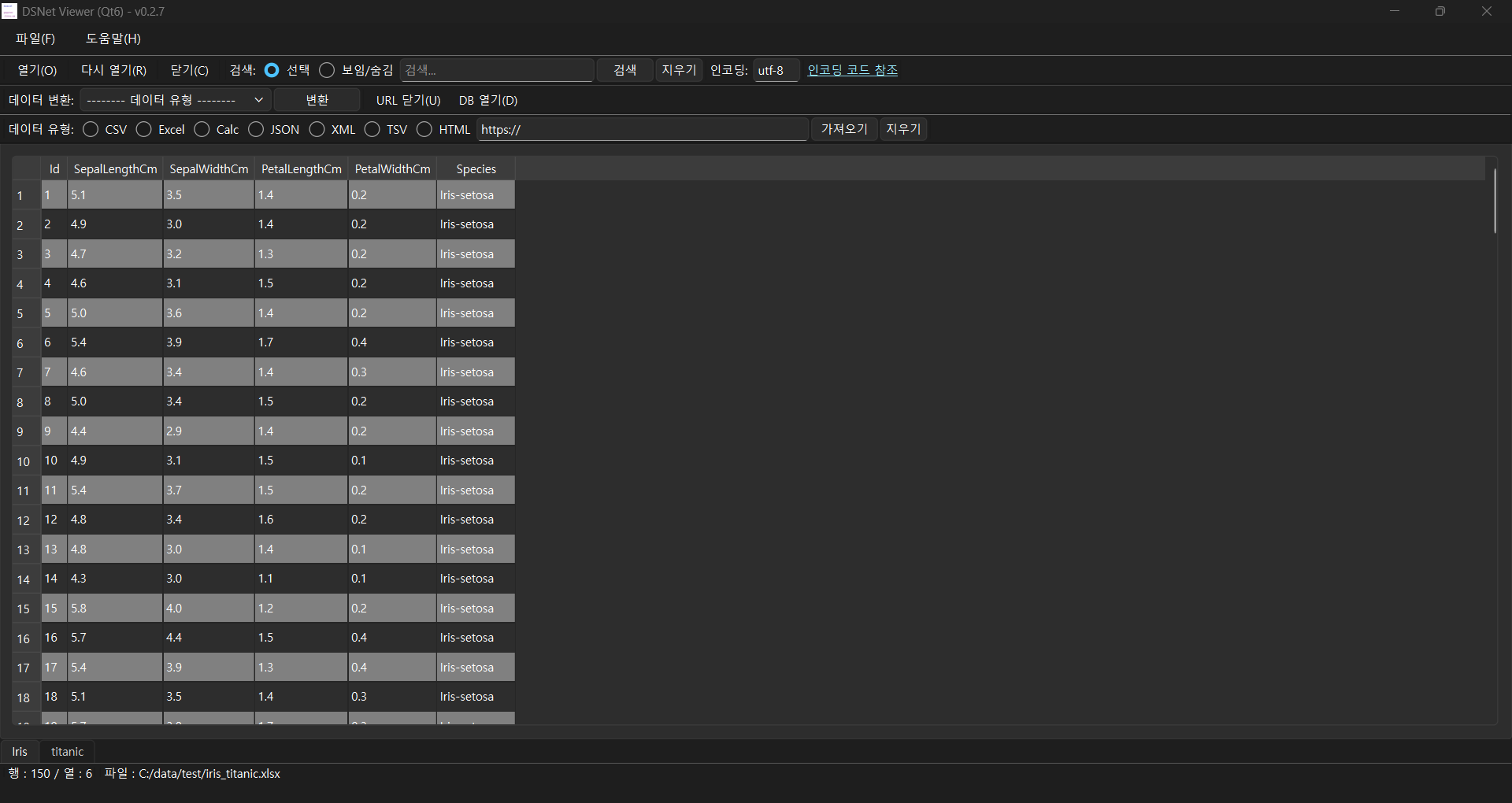
[ Running screen ]

* The first line of data is used as the column header name.


dsn-viewer-0.2.1-Setup-x86_64.exe file sha256 hash value : 77b93bbe8e07fb40961eac2191547c737f570c0df1576d57adb1e95397db7d46


* To check the SHA256 hash of a file in Windows 11,
use the PowerShell command Get-FileHash <file_path> -Algorithm SHA256. 

Alternatively, use certutil -hashfile <file_path> SHA256 in Command Prompt.


[ Command Prompt ]
C:\Users\gangserver\Downloads>certutil -hashfile dsn-viewer-0.2.1-Setup-x86_64.exe SHA256
SHA256의 dsn-viewer-0.2.1-Setup-x86_64.exe 해시:
77b93bbe8e07fb40961eac2191547c737f570c0df1576d57adb1e95397db7d46
CertUtil: -hashfile 명령이 성공적으로 완료되었습니다.


[ PowerShell ]

PS C:\Users\gangserver\Downloads> Get-FileHash dsn-viewer-0.2.1-Setup-x86_64.exe -Algorithm SHA256

Algorithm       Hash                                                                   Path
---------       ----                                                                   ----
SHA256          77B93BBE8E07FB40961EAC2191547C737F570C0DF1576D57ADB1E95397DB7D46       C:\Users\gangserver\Downloads\dsn-viewe...


* If an error occurs when running a file on Windows, please refer to the information below.

https://learn.microsoft.com/en-us/answers/questions/2827535/we-used-to-have-to-upon-downloading-a-file-from-an


We used to have to, upon downloading a file from another computer, go to the file's Properties and then go to the General page t

Before we could use a downloaded file (from another computer), we were required to right-click on the file, select Properties and the General. We were told this was a security measure to help protect you computer from malware sneaking onto your computer…

learn.microsoft.com


[ Uninstallation ]

(* The version in the screenshot appears to be 0.2.0, but it is actually displayed as 0.2.1.)

Remove the installed DSN Viewer 0.2.1 from Add/Remove Programs.


[ Development environment ]

(* Bold text indicates updated modules.)

python      : 3.13.x

PyQt5       : 5.15.11
pyinstaller : 6.21.0

pandas     : 3.0.5

python-calamine : 0.8.2

lxml           : 6.1.1

xlsxwriter  : 3.2.9

openpyxl  : 3.1.5
xlrd           : 2.0.2
odfpy        : 1.4.1


[ License ]

This program is freeware.
(This program is available for anyone to use for free.)

This program does not warrant against any problems that may occur during use.

This program does not collect or transmit any personal information or data from users.

This program can only be distributed on the following site.

http://dasom.net
https://gangserver.tistory.com


[ Version history ]

0.2.1 (2026-08-06 [Y-M-D])
- Python module version upgrade(pandas)
- Change default text encoding: "utf_8" to "utf-8"
  (Resolves encoding errors when reading XML files)


0.2.0 (2026-07-24 [Y-M-D])
- Windows : NSIS installer packaging


0.1.9 (2026-07-22 [Y-M-D])
- Treat text encoding format as user input


0.1.8 (2026-07-14 [Y-M-D])
- Python module version upgrade(pandas, python-calamine, lxml, pyinstaller)


0.1.7 (2026-04-17 [Y-M-D])
- TSV(Tab-Separated Values) data format(.tsv) support
- Apply background color to the row

0.1.6 (2026-04-08 [Y-M-D])
- Support for multiple sheets in Excel/Calc files
- Fixed an issue where memory continued to increase when opening files
- XML data format(.xml) support

0.1.5 (2026-03-27 [Y-M-D])
- Unify local file and URL open data loading
- Added data conversion function
- Change to Calamine engine when opening Excel/Calc files

0.1.4 (2026-03-23 [Y-M-D])
- Added a view feature using a URL
- JSON data format(.json) support

0.1.3 (2026-03-16 [Y-M-D])
- Data is processed using "UTF-8" encoding by default when loading,
  but if it fails, it is additionally processed using "CP949" encoding.
- Partial modification to reduce data processing speed.

0.1.2 (2026-03-08 [Y-M-D])
- Added search function

0.1.1 (2026-03-04 [Y-M-D])
- Add a toolbar

0.1.0 (2026-03-02 [Y-M-D])
- Initial version


728x90
반응형