Ubuntu 24.04 Visual Studio Code Install / Uninstall
1. Install
2. Uninstall
Install
1. Download Visual Studio Code (Ubuntu/Debian - x64 - .deb)
https://code.visualstudio.com/thank-you?dv=linux64_deb
- Check the download file
$ ls -al
-rw-rw-r-- 1 gangserver gangserver 238188742 8월 21 16:01 code_1.134.0-1787078834_amd64.deb
2. Install
(* Please change the filename to the downloaded filename.)
$ sudo apt install ./code_1.134.0-1787078834_amd64.deb
or
$ sudo dpkg -i code_1.134.0-1787078834_amd64.deb
[ Execution log ]
gangserver@RC530-U0407:~/Downloads$ sudo apt install ./code_1.134.0-1787078834_amd64.deb
패키지 목록을 읽는 중입니다... 완료
의존성 트리를 만드는 중입니다... 완료
상태 정보를 읽는 중입니다... 완료
주의, './code_1.134.0-1787078834_amd64.deb' 대신에 'code' 패키지를 선택합니다
다음 새 패키지를 설치할 것입니다:
code
0개 업그레이드, 1개 새로 설치, 0개 제거 및 0개 업그레이드 안 함.
0 바이트/238 M바이트 아카이브를 받아야 합니다.
이 작업 후 1,069 M바이트의 디스크 공간을 더 사용하게 됩니다.
(... Log omitted ...)
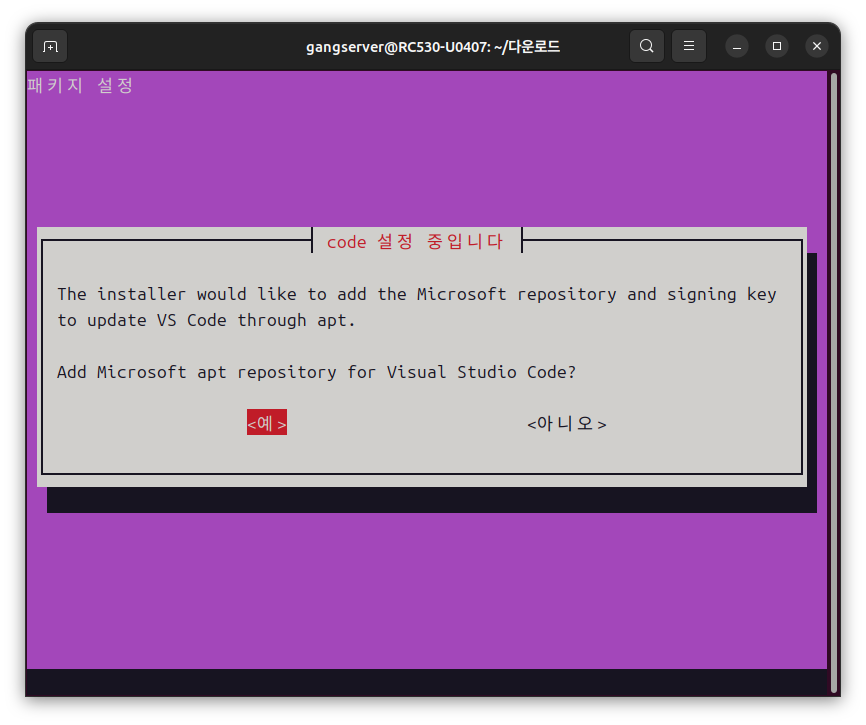
* On the screen asking to [Add Microsoft apt repository for Visual Studio Code], select <Yes> and press Enter.
Uninstall
$ sudo apt remove code
or
$ sudo dpkg -r code
[ Execution log ]
gangserver@RC530-U0407:~$ sudo apt remove code
[sudo] gangserver 암호:
패키지 목록을 읽는 중입니다... 완료
의존성 트리를 만드는 중입니다... 완료
상태 정보를 읽는 중입니다... 완료
다음 패키지를 지울 것입니다:
code
0개 업그레이드, 0개 새로 설치, 1개 제거 및 0개 업그레이드 안 함.
이 작업 후 1,069 M바이트의 디스크 공간이 비워집니다.
계속 하시겠습니까? [Y/n] y
(... Log omitted ...)