1. Install
2. Uninstall
Install
1. Download Visual Studio Code (Ubuntu/Debian - x64 - .deb)
https://code.visualstudio.com/thank-you?dv=linux64_deb
- Check the download file
gangserver@TCM73-U0424:~/Downloads$ ls -al
total 145132
drwxrwxr-x 2 gangserver gangserver 4096 Apr 24 16:11 .
drwxr-x--- 22 gangserver gangserver 4096 Apr 24 15:43 ..
-rw-rw-r-- 1 gangserver gangserver 148599950 Apr 24 15:53 code_1.117.0-1776814346_amd64.deb
2. Install
(* Please change the filename to the downloaded filename.)
$ sudo apt install ./code_1.117.0-1776814346_amd64.deb
or
$ sudo dpkg -i code_1.117.0-1776814346_amd64.deb
[ Execution log ]
gangserver@TCM73-U0424:~/Downloads$ sudo apt install ./code_1.117.0-1776814346_amd64.deb
[sudo: authenticate] 비밀번호:
주의, './code_1.117.0-1776814346_amd64.deb' 대신에 'code' 패키지를 선택합니다
설치할 패키지:
code
설치할 의존성 패키지:
socat
요약:
업그레이드: 0, 설치: 2, 삭제: 0, 업그레이드 안 함: 0
다운로드 크기: 402 kB / 149 MB
필요한 공간: 680 MB / 17.2 GB 사용 가능
계속하시겠습니까? [Y/n] y
(... Log omitted ...)
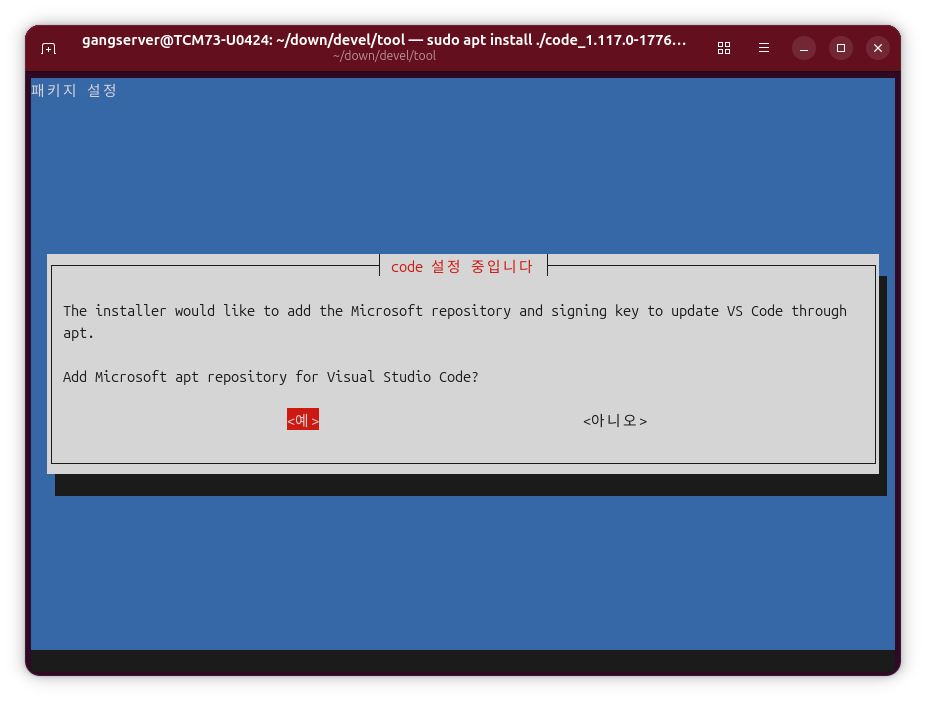
* On the screen asking to [Add Microsoft apt repository for Visual Studio Code], select <Yes> and press Enter.
Uninstall
$ sudo apt remove code
or
$ sudo dpkg -r code
[ Execution log ]
gangserver@TCM73-U0424:~$ sudo apt remove code
제거할 패키지:
code
요약:
업그레이드: 0, 설치: 0, 삭제: 1, 업그레이드 안 함: 0
비워진 공간: 676 MB
계속하시겠습니까? [Y/n] y
(... Log omitted ...)
'OS > Ubuntu' 카테고리의 다른 글
| sandbox error when running AppImage file (0) | 2026.09.03 |
|---|---|
| "dlopen(): error loading libfuse.so.2" error when running AppImage file (0) | 2026.09.03 |
| Ubuntu 24.04 Visual Studio Code Install / Uninstall (0) | 2026.08.21 |
| Ubuntu uname -a (0) | 2026.08.19 |
| 리눅스 한컴오피스 2022 베타, 한글 2020 베타 다운로드 (0) | 2026.08.19 |