(Korean) 아래 설명은 영어로 되어 있습니다.
윈도우(Windows)용 한국어 설명은 아래 링크를 참고해주세요.
- Windows 11 CSV(.csv), Excel(.xlsx, .xls), OpenDocument Spreadsheet Calc(.ods), JSON(.json), XML(.xml), TSV(.tsv), HTML(.html, .htm) simple viewer
* Version : 0.2.7
* Release date : 2026-10-12 [Y-M-D]
- Patch date : 2026-10-15 [Y-M-D]
*** Only the Qt6 version is being released for this version. (The Qt5 version is not being released)
* Starting with version 0.2.0, the Windows version is distributed as an NSIS(Nullsoft Scriptable Install System) installer.
(e.g., dsnet-viewer-[Qt version]-[Version]-Setup-x86_64.exe)
This is the last version for Windows. If an error occurs, please refer to the link below for the older version.
- NSIS installer version / Portable version
(v 0.2.6) http://dasom.net/446
* If you need the last version for Ubuntu, please refer to the link below.
- Debian package version(.deb) / AppImage version / Portable version
(v 0.2.7) http://dasom.net/450
This is a CSV, Excel, (LibreOffice/OpenOffice) Calc, JSON, XML, TSV(Tab-Separated Values) and HTML simple viewer developed using (Qt6 version : pandas + PySide6 + pyinstaller).
[ Features ]
- It reads the file and displays it on the screen in a table format.
- Open local files.
- Open remote files using a URL.
- (Supports local files only; remote files not supported) Convert file formats (e.g., convert an xlsx document to csv).
- Simple search function: Search within an opened file using keywords.
- Queries the database. (Only MySQL/MariaDB and SQLite3 are supported.) (Supported from version v0.2.7.)
- Supported file extensions : csv, xlsx, xls, ods, json, xml, tsv, html, htm
* For HTML (.html, .htm) data, only data formatted as tables (using the "<table>" tag) within the HTML file is processed; therefore, data cannot be imported if there are no tables ("<table>" tags).
[ Download ]
Caution! - To prevent spam downloads, the download URL below is changed periodically.
( Qt6 version )
- Installer version (filename : dsnet-viewer-qt6-0.2.7-Setup-x86_64.exe / 81MB)
https://drive.google.com/file/d/1Sz5V4L8U8xZLdBaf_IGidljUAexX2GzW/view?usp=sharing
- Portable version (filename : dsnet-viewer-qt6.exe / 82MB)
https://drive.google.com/file/d/1e03wlRWCc5Xe_oer-rYhpfhH-PBdiGw-/view?usp=sharing
[ Documentation ]
Please refer to the URL below for the documentation.
http://gangserver.dothome.co.kr/dsnet-viewer
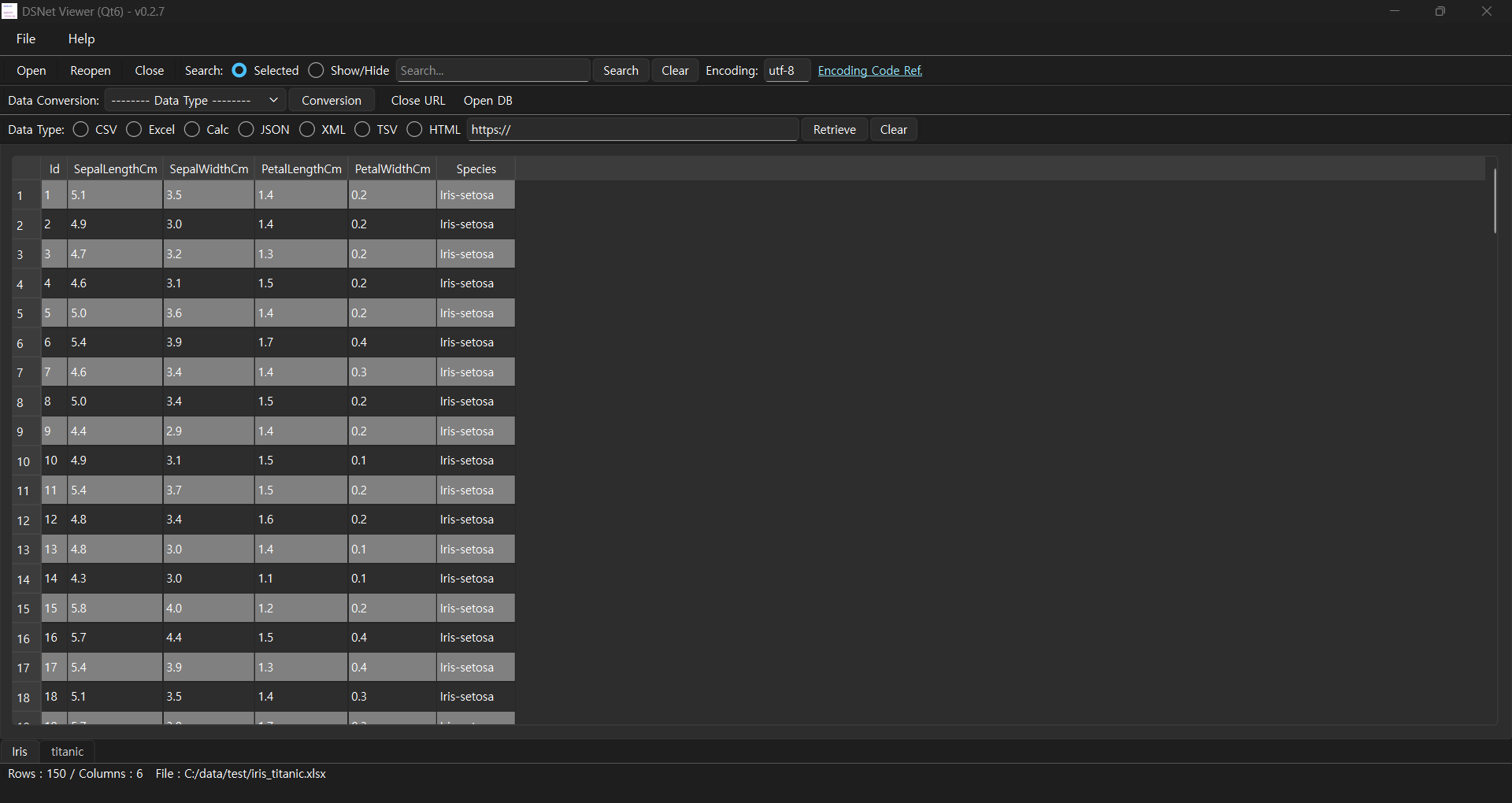
[ Running screen ] - Screen when OS dark theme is applied
* The first line of data is used as the column header name.
( Qt6 )
[ File hash check ]
File sha256 hash value :
( Qt6 )
- dsnet-viewer-qt6-0.2.7-Setup-x86_64.exe :
ccb5467b84f1c0d7675146203cdbed105d97ab0571394adefa18a2bcfc98e4fd
- dsnet-viewer-qt6.exe :
7a9ee19e9e534d4dc8bcf20d2e782991bd09bbb2e513186a9d6438140cd94082
[ Development environment ]
(* Bold text indicates updated modules.)
python : 3.12.x
pandas : 3.0.6
python-calamine : 0.8.3
lxml : 6.1.3
xlsxwriter : 3.2.9
openpyxl : 3.1.5
xlrd : 2.0.2
odfpy : 1.4.1
pyinstaller : 6.22.3
beautifulsoup4 : 4.15.0
html5lib : 1.1
(Added)
SQLAlchemy : 2.1.4
PyMySQL : 2.2.8
cryptography : 50.0.2
( Qt6 )
PySide6 : 6.12.0
[ Update information ]
0.2.7 (2026-10-12 [Y-M-D])
- Added DB query (supports MySQL/MariaDB, SQLite3 only)
- Qt6 : Changed to run in maximized screen
- Korean language support based on locale