반응형

센트os 10

CentOS Stream 9 : libgtk-x11-2.0.so.0 error when running Double Commander

[ Error message ][gangserver@localhost doublecmd]$ ./doublecmd ./doublecmd: error while loading shared libraries: libgtk-x11-2.0.so.0: cannot open shared object file: No such file or directory [ Solve ]Install gtk2$ sudo dnf install gtk2 [gangserver@localhost doublecmd]$ sudo dnf install gtk2 마지막 메타자료 만료확인(1:07:25 이전): 2025년 09월 22일 (월) 오전 06시 39분 11초. 종속성이 해결되었습니다. ============================..

OS/CentOS 2025.09.22

CentOS Stream 9 python 3.13 install

Current Python version$ python --versionor$ python -V [ Execution Log ][gangserver@localhost ~]$ python --version Python 3.9.23 Install Python 3.13$ sudo dnf install python3.13or$ sudo yum install python3.13 [ Execution Log ][gangserver@localhost ~]$ sudo dnf install python3.13 마지막 메타자료 만료확인(0:53:04 이전): 2025년 09월 22일 (월) 오전 06시 39분 11초. 종속성이 해결되었습니다. ===========================================..

OS/CentOS 2025.09.22

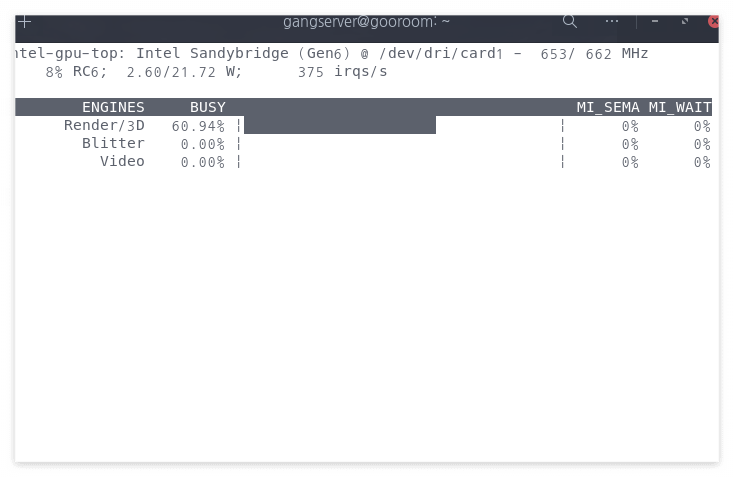
Linux (Ubuntu / CentOS) Intel GPU Monitor

[ Install ]Ubuntu$ sudo apt install intel-gpu-tools CentOS$ sudo yum install intel-gpu-tools [ Run ]$ sudo intel_gpu_top [ Ubuntu installation log ]$ sudo apt install intel-gpu-tools gangserver@gooroom:~$ sudo apt install intel-gpu-tools패키지 목록을 읽는 중입니다... 완료의존성 트리를 만드는 중입니다... 완료상태 정보를 읽는 중입니다... 완료 다음 새 패키지를 설치할 것입니다: intel-gpu-tools0개 업그레이드, 1개 새로 설치, 0개 제거 및 0개 업그레이드 안 함.2,339 k바이트 ..

OS/Linux 2025.03.22

CentOS Stream 9 MariaDB Server Install / Uninstall

1. Install 2. Uninstall Install$ sudo dnf install mariadb-server [gangserver@localhost ~]$ sudo dnf install mariadb-server마지막 메타자료 만료확인(2:39:56 이전): 2025년 02월 26일 (수) 오후 07시 46분 22초.종속성이 해결되었습니다.================================================================================ 꾸러미 구조 버전 저장소 크기=======================================================..

OS/CentOS 2025.02.26

CentOS 7.9 (2009) Chrome Install

1. Chrome Downloadhttps://www.google.com/chrome/ Chrome 웹브라우저Google의 스마트 기능으로 더욱 간편하고 안전하고 빨라졌습니다.www.google.com 2. Navigate to the downloaded directory$ cd /download_directory 3. Chrome installation- Dependency error occurred$ sudo rpm -ivh google-chrome-stable_current_x86_64.rpm경고: google-chrome-stable_current_x86_64.rpm: Header V4 DSA/SHA1 Signature, key ID 7fac5991: NOKEY오류: Failed depende..

OS/CentOS 2020.11.24
728x90
반응형