반응형
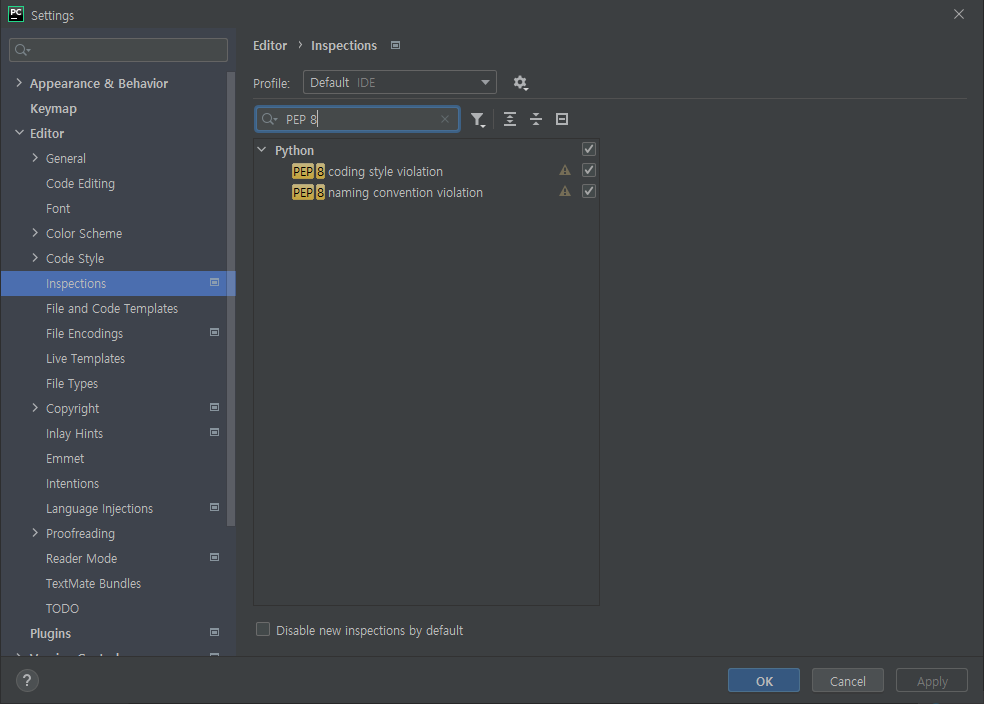
1. File > Settings... (Ctrl+Alt+S)
2. Editor > Inspections
3. Search "PEP 8"
4. Check box checked
- PEP 8 coding style violation
- PEP 8 naming convention violation
반응형
LIST
'개발 > Python' 카테고리의 다른 글
| Ubuntu 20.04 Python 3.9 / 3.10 install (1) | 2022.04.04 |
|---|---|
| Python 3.9 pip run error (0) | 2022.01.11 |
| PyTorch CPU version install (Windows / Linux) (PIP / Anaconda) (0) | 2021.06.18 |
| ImportError: ('You must install pydot (`pip install pydot`) and install graphviz (0) | 2021.06.15 |
| Python runtime measurement (0) | 2021.06.11 |