파이썬 가상 환경 만들기 1. PIP 모듈 설치> pip install virtualenv virtualenvwrapper (* 윈도우는 virtualenvwrapper-win 설치> pip install virtualenv virtualenvwrapper-win) 사용mkvirtualenv : 가상 환경 생성deactivate : 가상 환경 종료rmvirtualenv : 가상 환경 삭제workon : 가상 환경 진입 개발/Python 2021.06.01
Anaconda3 spyder 5.0.0 install 1. anaconda update$ conda update anaconda 2. spyder install$ conda install spyder=5.0.0 개발/Python 2021.05.21
Linux git install Ubuntu :$ sudo apt install git CentOS :$ sudo yum install gitor$ sudo dnf install git 참고 : www.git-scm.com/download/linux GitDownload for Linux and Unix It is easiest to install Git on Linux using the preferred package manager of your Linux distribution. If you prefer to build from source, you can find tarballs on kernel.org. The latest version is 2.31.1. Debian/Ubuntu For the lwww.git-scm.com OS/Linux 2021.04.22
Sublime Text 3 Install 1.$ wget -qO - https://download.sublimetext.com/sublimehq-pub.gpg | sudo apt-key add - 2.$ sudo apt install apt-transport-https 3. (Stable)$ echo "deb https://download.sublimetext.com/apt/stable/" | sudo tee /etc/apt/sources.list.d/sublime-text.list 4. update & install$ sudo apt update$ sudo apt install sublime-text 참조 : www.sublimetext.com/docs/3/linux_repositories.html#apt Linux Package M.. OS/Ubuntu 2021.04.16
PIP 패키지 설치 $ pip install (패키지명)예) $ pip install numpy 패키지 버전 지정 설치$ pip install (패키지명)=(버전)예) $ pip install numpy=1.19.5 프록시 서버 환경에서 설치$ pip install (패키지명) --proxy (프록시서버 주소)예) $ pip install numpy --proxy http://192.168.0.1:8080 PIP 설치 시 SSL 인증 오류 발생하는 경우$ pip install --trusted-host (host 주소) --trusted-host (host 주소) (패키지명) --proxy (프록시서버 주소)예) $ pip install --trusted-host pypi.org --trusted-host files... 개발/Python 2021.04.16
Ubuntu Python IDLE Install Python 3:$ sudo apt install idle3 Python 2:$ sudo apt install idle-python2.7 Execute IDLE$ idle or (background running) $ idle & 개발/Python 2021.04.15
Windows 10 Python 64bit, 32bit install 1. Python 64bit installation(Check [V] Add Python 3.9 to PATH option) * Python 64bint version : 3.9.4(ex, C:\Dev\Python\Python39) 2. Python 32bit installation(Uncheck [ ] Add Python 3.9 to PATH option) * Python 32bit version : 3.9.2(ex, C:\Dev\Python\python39-32) 3. Python version checkC:\Dev> python --version (or python -V)Python 3.9.4 3. Create virtual environment directoryC:\Dev.. 개발/Python 2021.04.15
CentOS 7 (x86_64) MariaDB 10.5 Install 1. Create /etc/yum.repos.d/MariaDB.repo file-----------------------------------------------------------------------------------------------------# MariaDB 10.5 CentOS repository list - created 2021-04-15 02:51 UTC# https://mariadb.org/download/[mariadb]name = MariaDBbaseurl = https://mirror.yongbok.net/mariadb/yum/10.5/centos7-amd64gpgkey=https://mirror.yongbok.net/mariadb/yum/RPM-GPG-KEY-MariaD.. DB/MariaDB 2021.04.15
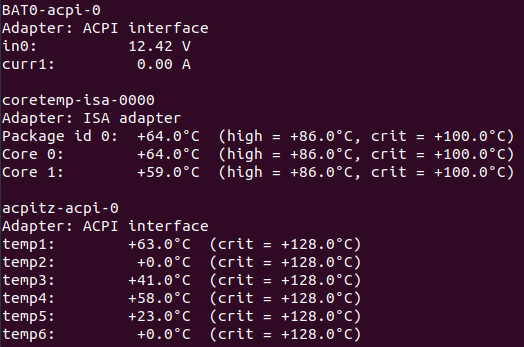
Ubuntu CPU 온도 체크 프로그램 1. lm-sensors 1.1 설치$ sudo apt install lm-sensors 1.2 센서 검색$ sudo sensors-detect 1.3 실행$ sensors 1.4 삭제$ sudo apt remove lm-sensors 2. xsensors 2.1 설치$ sudo apt install xsensors 2.2 실행$ xsensors 2.3 삭제$ sudo apt remove xsensors OS/Ubuntu 2021.03.29
CentOS 7.9 (2009) Chrome Install 1. Chrome Downloadhttps://www.google.com/chrome/ Chrome 웹브라우저Google의 스마트 기능으로 더욱 간편하고 안전하고 빨라졌습니다.www.google.com 2. Navigate to the downloaded directory$ cd /download_directory 3. Chrome installation- Dependency error occurred$ sudo rpm -ivh google-chrome-stable_current_x86_64.rpm경고: google-chrome-stable_current_x86_64.rpm: Header V4 DSA/SHA1 Signature, key ID 7fac5991: NOKEY오류: Failed depende.. OS/CentOS 2020.11.24