(English) The description below is in Korean.
Please refer to the link below for the English description for Ubuntu.
- 우분투(Ubuntu) 24.04 CSV(.csv), 엑셀/Excel(.xlsx, .xls), OpenDocument Spreadsheet Calc(.ods), JSON(.json), XML(.xml), TSV(.tsv) 심플 뷰어
* 버전 : 0.2.4
* 릴리즈 날짜 : 2026-09-09
- 패치 날짜 :
* 버전 0.2.0부터 우분투(Ubuntu) 버전은 데비안 패키지(.deb)로 배포됩니다.
(예, dsn-viewer-[qt version]_[version]_amd64.deb)
이것은 우분투(Ubuntu)용 구버전입니다. 최신 버전은 아래 링크를 참조해 주십시오.
- 데비안 패키지 버전(.deb) / 앱이미지(AppImage) 버전 / 포터블(Portable) 버전
(v 0.2.7) http://dasom.net/451
* 만약, 윈도우(Windows)용 최신 버전이 필요하시면 아래 링크를 참조해 주세요.
- NSIS 인스톨러(installer) 버전 / 포터블(Portable) 버전
(v 0.2.7) http://dasom.net/452
이 프로그램은 CSV, 엑셀/Excel, (리브레오피스/LibreOffice / 오픈오피스/OpenOffice) Calc, JSON, XML, TSV(Tab-Separated Values) 심플 뷰어입니다.
다음을 사용하여 개발되었습니다.
(Qt6 버전: pandas + PySide6 + pyinstaller), (Qt5 버전: pandas + PyQt5 + pyinstaller)
[ 다운로드 ]
주의! - 스팸성 다운로드를 방지하기 위해 아래 다운로드 URL은 주기적으로 변경됩니다.
( Qt6 버전 )
- 데비안 패키지 버전 (파일명 : dsn-viewer-qt6_0.2.4_amd64.deb / 96MB)
https://drive.google.com/file/d/1g3wa3L9TY8Im22N_PZBd-gIgg2snMahn/view?usp=sharing
-앱이미지(AppImage) 버전 (파일명 : dsn-viewer-qt6-0.2.4-x86_64.AppImage / 97MB)
https://drive.google.com/file/d/1kOB5aYlsBwf6ODQ1UM7HXofJTHLtqiX_/view?usp=sharing
- 포터블(Portable) 버전 (파일명 : dsn-viewer-qt6 / 97MB)
https://drive.google.com/file/d/1kMImvZc7gKPx1Sdrhfe6A0LFU4aq43po/view?usp=sharing
( Qt5 버전 )
- 데비안 패키지 버전 (파일명 : dsn-viewer-qt_0.2.4_amd64.deb / 79MB)
https://drive.google.com/file/d/1fAu9a6QSsKUiYfmesR45tzZ3Wip6Yt3t/view?usp=sharing
- 앱이미지(AppImage) 버전 (파일명 : dsn-viewer-qt-0.2.4-x86_64.AppImage / 80MB)
https://drive.google.com/file/d/1IlcvoY3XidGCsyRKk_E0md2RVVXVsar9/view?usp=sharing
- 포터블(Portable) 버전 (파일명 : dsn-viewer-qt / 80MB)
https://drive.google.com/file/d/1GFHLB-RPKhO7OVVlzdsa9_Xr58OzMXtB/view?usp=sharing
[ 설치 / 제거 / 라이선스 ]
설치, 제거, 라이선스 관련된 사항은 아래 링크를 참고해주세요.
[ 실행 화면 ] - OS 다크 테마가 적용된 화면
* 데이터의 첫 번째 행은 열 이름으로 사용됩니다.
( Qt6 )
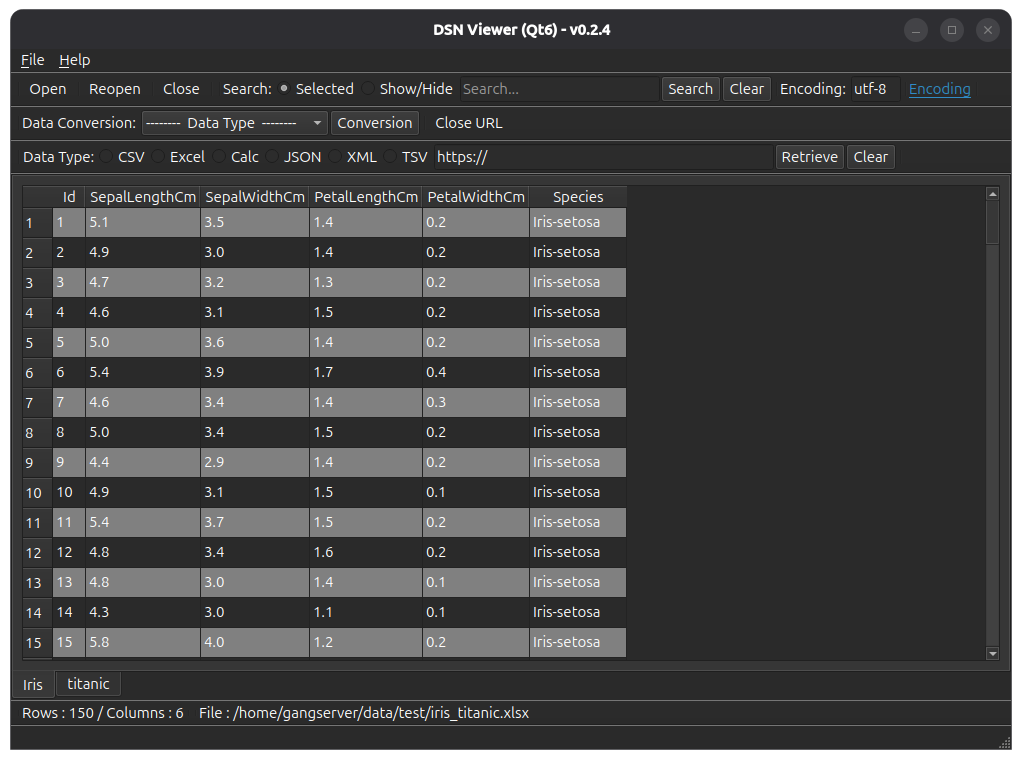
( Qt5 )

[ 파일 해시(hash) 확인 ]
파일 SHA256 해시(hash) 값 :
( Qt6 )
- dsn-viewer-qt6_0.2.4_amd64.deb :
527918ce5e350568067f48458f7c1cb91f10cb72f97422504607b14a642782b0
- dsn-viewer-qt6-0.2.4-x86_64.AppImage :
72851ba505b839e01f792f5c9be6e85f70cc4ee1a1c94e9ae5b65a54a3466a5c
- dsn-viewer-qt6 :
720802c69f949c02882cc5af20ea0e823d60ced7012560d9d24762e5b7e55aa0
( Qt5 )
- dsn-viewer-qt_0.2.4_amd64.deb :
28bf5f91c4ba0268c552953d32cfa028520e4e61b89f2015c42cd8530f917656
- dsn-viewer-qt-0.2.4-x86_64.AppImage :
aa1eace831c4b2ad98ec7f6e40c0e891316f6eba2b804f19617142eef9983fd6
- dsn-viewer-qt :
5740807989cfc34ca823f49180c3030e8e7c7a6947249d74df0deb079613208c
* 우분투(Ubuntu)에서 파일의 SHA256 해시를 확인하려면,
터미널에서 sha256sum <파일_경로> 명령어를 사용하세요.
$ sha256sum dsn-viewer-qt6_0.2.4_amd64.deb
527918ce5e350568067f48458f7c1cb91f10cb72f97422504607b14a642782b0 dsn-viewer-qt6_0.2.4_amd64.deb
[ 개발 환경 ]
(* 굵은(볼드) 글씨는 업데이트된 모듈을 의미합니다.)
python : 3.12.x
pandas : 3.0.5
python-calamine : 0.8.2
lxml : 6.1.3
xlsxwriter : 3.2.9
openpyxl : 3.1.5
xlrd : 2.0.2
odfpy : 1.4.1
pyinstaller : 6.22.2
( Qt6 )
PySide6 : 6.11.2
( Qt5 )
PyQt5 : 5.15.11
[ 업데이트 정보 ]
0.2.4 (2026-09-09)
- OS 다크 테마 사용 시 배경색이 적용된 행의 데이터가 보이지 않던 문제 수정