(Korean) 아래 설명은 영어로 되어 있습니다.
우분투(Ubuntu)용 한국어 설명은 아래 링크를 참고해주세요.
- Ubuntu 24.04 CSV(.csv), Excel(.xlsx, .xls), OpenDocument Spreadsheet Calc(.ods), JSON(.json), XML(.xml), TSV(.tsv), HTML(.html, .htm) simple viewer
* Version : 0.2.5
* Release date : 2026-09-22 [Y-M-D]
- Patch date :
* Starting with version 0.2.0, the Ubuntu version is distributed as a Debian package(.deb).
(e.g., dsn-viewer-[Qt version]_[Version]_amd64.deb)
This is an older version for Ubuntu. For the latest version, please refer to the link below.
- Debian package version(.deb) / AppImage version / Portable version
(v 0.2.7) http://dasom.net/450
* If you need the last version for Windows, please refer to the link below.
- NSIS installer version / Portable version
(v 0.2.7) http://dasom.net/449
This is a CSV, Excel, (LibreOffice/OpenOffice) Calc, JSON, XML, TSV(Tab-Separated Values) and HTML simple viewer developed using (Qt6 version : pandas + PySide6 + pyinstaller), (Qt5 version : pandas + PyQt5 + pyinstaller).
[ Features ]
- It reads the file and displays it on the screen in a table format.
- Open local files.
- Open remote files using a URL.
- (Supports local files only; remote files not supported) Convert file formats (e.g., convert an xlsx document to csv).
- Simple search function: Search within an opened file using keywords.
- Supported file extensions : csv, xlsx, xls, ods, json, xml, tsv, html, htm
* For HTML (.html, .htm) data, only data formatted as tables (using the "<table>" tag) within the HTML file is processed; therefore, data cannot be imported if there are no tables ("<table>" tags).
[ Download ]
Caution! - To prevent spam downloads, the download URL below is changed periodically.
( Qt6 version )
- Debian package version (filename : dsnet-viewer-qt6_0.2.5_amd64.deb / 96MB)
https://drive.google.com/file/d/17Yyh0hmGbAYh3bPMIsmS4SrIukTaOT6A/view?usp=sharing
- AppImage version (filename : dsnet-viewer-qt6-0.2.5-x86_64.AppImage / 97MB)
https://drive.google.com/file/d/10HjXYjI8vgkCwvv1t1HWA387ebcI8TM4/view?usp=sharing
- Portable version (filename : dsnet-viewer-qt6 / 97MB)
https://drive.google.com/file/d/178L7W5IbFObCdzFO8p9BZRH-YJ2x7dCX/view?usp=sharing
( Qt5 version )
- Debian package version (filename : dsnet-viewer-qt_0.2.5_amd64.deb / 80MB)
https://drive.google.com/file/d/1-Zzx9fEhdz2uG_YFGMBsAyjS4p42m_xG/view?usp=sharing
- AppImage version (filename : dsnet-viewer-qt-0.2.5-x86_64.AppImage / 81MB)
https://drive.google.com/file/d/1pO0CGVUjBIjDWJTy5TTBP8HdTajoCur8/view?usp=sharing
- Portable version (filename : dsnet-viewer-qt / 80MB)
https://drive.google.com/file/d/1v7H5mOkPeI4yRgpCl4cNQnS1TSjRViMI/view?usp=sharing
[ Documentation ]
Please refer to the URL below for the documentation.
http://gangserver.dothome.co.kr/dsnet-viewer
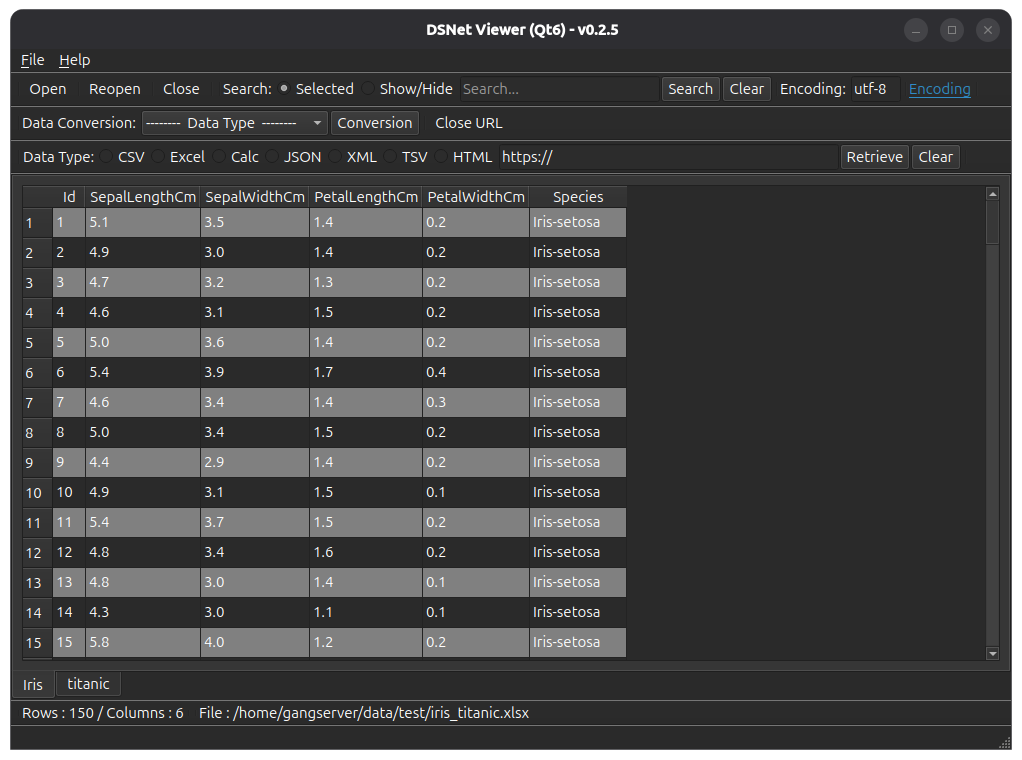
[ Running screen ] - Screen when OS dark theme is applied
* The first line of data is used as the column header name.
( Qt6 )
( Qt5 )

[ File hash check ]
File SHA256 hash value :
( Qt6 )
- dsnet-viewer-qt6_0.2.5_amd64.deb :
787e316ee8e65f98c0ff9afc7b5a515484a50f452c6667775166f6e15ace623c
- dsnet-viewer-qt6-0.2.5-x86_64.AppImage
78a6776e810105b327ee952a7cb645d7df29bc44300ff39bd16e260e50666655
- dsnet-viewer-qt6 :
b9f2638505d736ae832d0d72090f70268e0919dc0ad1a1d7633a52d4974ddc14
( Qt5 )
- dsnet-viewer-qt_0.2.5_amd64.deb :
abf2d989b8e47d9843055936ac78dcc1fc453b470cdd73d6c529b2e5fab65325
- dsnet-viewer-qt-0.2.5-x86_64.AppImage
ec3668fc2061d8fde50b999073a98b4a8eb3cef3dd9a155df548b13a21b2a23b
- dsnet-viewer-qt :
4544047d70000bf46e63a514fd48858182f355be5fffb3e3fe32f81d66cbe52d
[ Development environment ]
(* Bold text indicates updated modules.)
python : 3.12.x
pandas : 3.0.6
python-calamine : 0.8.2
lxml : 6.1.3
xlsxwriter : 3.2.9
openpyxl : 3.1.5
xlrd : 2.0.2
odfpy : 1.4.1
pyinstaller : 6.22.3
(Added)
beautifulsoup4 : 4.15.0
html5lib : 1.1
( Qt6 )
PySide6 : 6.11.2
( Qt5 )
PyQt5 : 5.15.11
[ Update information ]
0.2.5 (2026-09-22 [Y-M-D])
- Application name changed : "DSN Viewer" to "DSNet Viewer"
- HTML data format(.html, .htm) support