(English) The description below is in Korean.
Please refer to the link below for the English description for Ubuntu.
- 우분투(Ubuntu) 24.04 CSV(.csv), 엑셀/Excel(.xlsx, .xls), OpenDocument Spreadsheet Calc(.ods), JSON(.json), XML(.xml), TSV(.tsv), HTML(.html, .htm) 심플 뷰어
* 버전 : 0.2.5
* 릴리즈 날짜 : 2026-09-22
- 패치 날짜 :
* 버전 0.2.0부터 우분투(Ubuntu) 버전은 데비안 패키지(.deb)로 배포됩니다.
(예, dsnet-viewer-[Qt version]_[Version]_amd64.deb)
이것은 우분투(Ubuntu)용 구버전입니다. 최신 버전은 아래 링크를 참조해 주십시오.
- 데비안 패키지 버전(.deb) / 앱이미지(AppImage) 버전 / 포터블(Portable) 버전
(v 0.2.7) http://dasom.net/451
* 만약, 윈도우(Windows)용 최신 버전이 필요하시면 아래 링크를 참조해 주세요.
- NSIS 인스톨러(installer) 버전 / 포터블(Portable) 버전
(v 0.2.7) http://dasom.net/452
이 프로그램은 CSV, 엑셀/Excel, (리브레오피스/LibreOffice / 오픈오피스/OpenOffice) Calc, JSON, XML, TSV(Tab-Separated Values), HTML 심플 뷰어입니다.
다음을 사용하여 개발되었습니다.
(Qt6 버전: pandas + PySide6 + pyinstaller), (Qt5 버전: pandas + PyQt5 + pyinstaller)
[ 기능 ]
- 파일을 읽어 테이블 구조로 화면에 표시합니다.
- 로컬 파일을 열 수 있습니다.
- 원격 파일을 URL을 이용해 열 수 있습니다.
- (로컬 파일만 지원/원격 파일은 지원 안함) 파일 포맷을 변환 할 수 있습니다. (예, xlsx 문서를 csv로 변환)
- 간단 검색 기능 : 읽은 파일을 키워드로 검색할 수 있습니다.
- 지원하는 파일 확장자 : csv, xlsx, xls, ods, json, xml, tsv, html, htm
* HTML(.html, .htm) 데이터의 경우 HTML 파일에 있는 테이블(<table> 태그) 형식의 데이터만 처리하므로 테이블(<table> 테그)가 없는 경우 데이터를 가져올 수 없습니다.
[ 다운로드 ]
주의! - 스팸성 다운로드를 방지하기 위해 아래 다운로드 URL은 주기적으로 변경됩니다.
( Qt6 버전 )
- 데비안 패키지 버전 (파일명 : dsnet-viewer-qt6_0.2.5_amd64.deb / 96MB)
https://drive.google.com/file/d/17Yyh0hmGbAYh3bPMIsmS4SrIukTaOT6A/view?usp=sharing
- 앱이미지(AppImage) 버전 (파일명 : dsnet-viewer-qt6-0.2.5-x86_64.AppImage / 97MB)
https://drive.google.com/file/d/10HjXYjI8vgkCwvv1t1HWA387ebcI8TM4/view?usp=sharing
- 포터블(Portable) 버전 (파일명 : dsnet-viewer-qt6 / 97MB)
https://drive.google.com/file/d/178L7W5IbFObCdzFO8p9BZRH-YJ2x7dCX/view?usp=sharing
( Qt5 버전 )
- 데비안 패키지 버전 (파일명 : dsnet-viewer-qt_0.2.5_amd64.deb / 80MB)
https://drive.google.com/file/d/1-Zzx9fEhdz2uG_YFGMBsAyjS4p42m_xG/view?usp=sharing
- 앱이미지(AppImage) 버전 (파일명 : dsnet-viewer-qt-0.2.5-x86_64.AppImage / 81MB)
https://drive.google.com/file/d/1pO0CGVUjBIjDWJTy5TTBP8HdTajoCur8/view?usp=sharing
- 포터블(Portable) 버전 (파일명 : dsnet-viewer-qt / 80MB)
https://drive.google.com/file/d/1v7H5mOkPeI4yRgpCl4cNQnS1TSjRViMI/view?usp=sharing
[ 설치 - 데비안 패키지 버전(.deb) ]
터미널을 실행한 후 다운로드한 디렉토리로 이동하여
다음과 같이 데비안 패키지 설치 명령을 실행하세요.
* Qt 버전, 어플리케이션 버전에 따라 아래와 같이 보여집니다.
| Qt 버전 | 어플리케이션 버전 | 파일명 |
| Qt6 | 0.2.5 | dsnet-viewer-qt6_0.2.5_amd64.deb |
| Qt5 | 0.2.5 | dsnet-viewer-qt_0.2.5_amd64.deb |
( Qt6 )
$ sudo dpkg -i dsnet-viewer-qt6_0.2.5_amd64.deb
또는
$ sudo apt install ./dsnet-viewer-qt6_0.2.5_amd64.deb
( Qt5 )
$ sudo dpkg -i dsnet-viewer-qt_0.2.5_amd64.deb
또는
$ sudo apt install ./dsnet-viewer-qt_0.2.5_amd64.deb
[ 실행 - 데비안 패키지 버전(.deb) ]
설치된 "DSNet Viewer ([Qt 버전])" 앱을 클릭하여 실행하세요.
( Qt6 )
( Qt5 )
[ 실행 - 앱이미지(AppImage) 버전 ]
- 실행 권한 확인
"dsnet-viewer-[Qt version]-[Version]-x86_64.AppImage" 파일에 실행 권한이 있는지 확인해 주세요.
실행 권한이 없다면 터미널을 실행하여 아래와 같이 권한을 추가해 주세요.
* Qt 버전, 어플리케이션 버전에 따라 아래와 같이 보여집니다.
| Qt 버전 | 어플리케이션 버전 | 파일명 |
| Qt6 | 0.2.5 | dsnet-viewer-qt6-0.2.5-x86_64.AppImage |
| Qt5 | 0.2.5 | dsnet-viewer-qt-0.2.5-x86_64.AppImage |
( Qt6 )
$ chmod u+x dsnet-viewer-qt6-0.2.5-x86_64.AppImage
( Qt5 )
$ chmod u+x dsnet-viewer-qt-0.2.5-x86_64.AppImage
- 실행
( Qt6 )
$ ./dsnet-viewer-qt6-0.2.5-x86_64.AppImage
또는
$ ./dsnet-viewer-qt6-0.2.5-x86_64.AppImage [파일 경로/파일명]
예) $ ./dsnet-viewer-qt6-0.2.5-x86_64.AppImage ~/data/sample.xlsx
( Qt5 )
$ ./dsnet-viewer-qt-0.2.5-x86_64.AppImage
또는
$ ./dsnet-viewer-qt-0.2.5-x86_64.AppImage [파일 경로/파일명]
예) $ ./dsnet-viewer-qt-0.2.5-x86_64.AppImage ~/data/sample.xlsx
[ 실행 - 포터블(Portable) 버전 ]
- 실행 권한 확인
"dsnet-viewer-[Qt version]" 파일에 실행 권한이 있는지 확인해 주세요.
실행 권한이 없다면 터미널을 실행하여 아래와 같이 권한을 추가해 주세요.
( Qt6 )
$ chmod u+x dsnet-viewer-qt6
( Qt5 )
$ chmod u+x dsnet-viewer-qt
- 실행
( Qt6 )
$ ./dsnet-viewer-qt6
또는
$ ./dsnet-viewer-qt6 [파일 경로/파일명]
예) $ ./dsnet-viewer-qt6 ~/data/sample.xlsx
( Qt5 )
$ ./dsnet-viewer-qt
또는
$ ./dsnet-viewer-qt [파일 경로/파일명]
예) $ ./dsnet-viewer-qt ~/data/sample.xlsx
[ 제거 - 데비안 패키지 버전(.deb) ]
터미널을 실행한 후, 다음과 같이 데비안 패키지 제거 명령을 실행하세요.
( Qt6 )
$ sudo apt remove dsnet-viewer-qt6
( Qt5 )
$ sudo apt remove dsnet-viewer-qt
[ 제거 - 앱이미지(AppImage) 버전 / 포터블(Portable) 버전 ]
다운로드 받은 파일을 삭제하시면 됩니다.
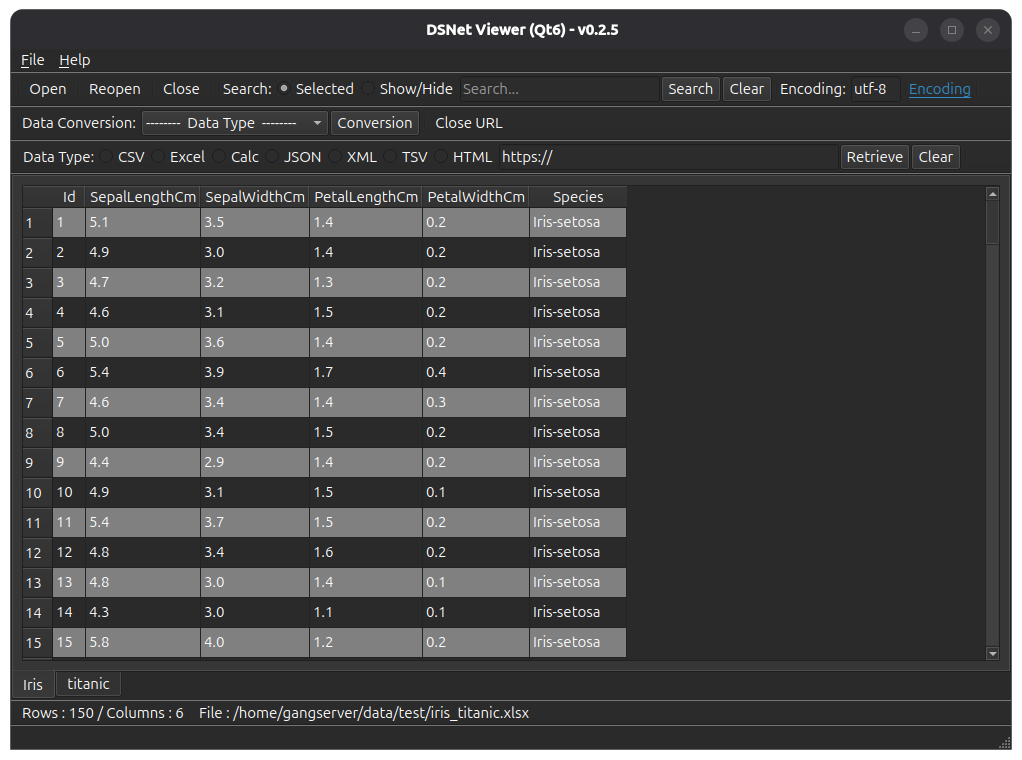
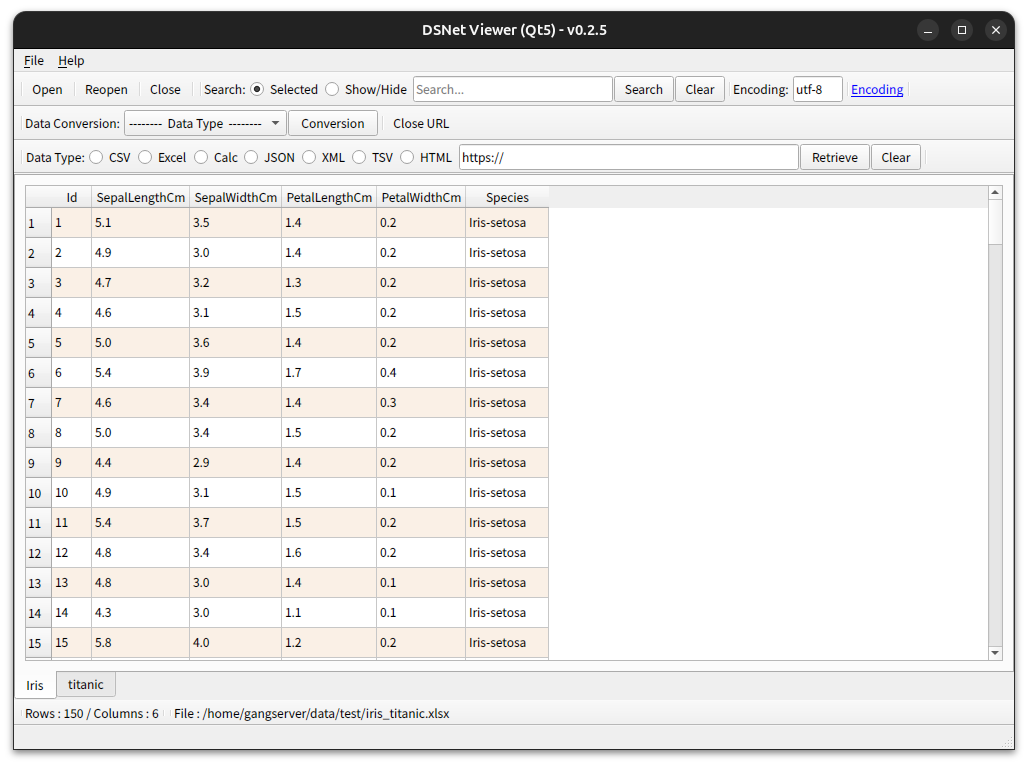
[ 실행 화면 ] - OS 다크 테마가 적용된 화면
* 데이터의 첫 번째 행은 열 이름으로 사용됩니다.
( Qt6 )
( Qt5 )
[ 파일 해시(hash) 확인 ]
파일 SHA256 해시(hash) 값 :
( Qt6 )
- dsnet-viewer-qt6_0.2.5_amd64.deb :
787e316ee8e65f98c0ff9afc7b5a515484a50f452c6667775166f6e15ace623c
- dsnet-viewer-qt6-0.2.5-x86_64.AppImage :
78a6776e810105b327ee952a7cb645d7df29bc44300ff39bd16e260e50666655
- dsnet-viewer-qt6 :
b9f2638505d736ae832d0d72090f70268e0919dc0ad1a1d7633a52d4974ddc14
( Qt5 )
- dsnet-viewer-qt_0.2.5_amd64.deb :
abf2d989b8e47d9843055936ac78dcc1fc453b470cdd73d6c529b2e5fab65325
- dsnet-viewer-qt-0.2.5-x86_64.AppImage :
ec3668fc2061d8fde50b999073a98b4a8eb3cef3dd9a155df548b13a21b2a23b
- dsnet-viewer-qt :
4544047d70000bf46e63a514fd48858182f355be5fffb3e3fe32f81d66cbe52d
* 우분투(Ubuntu)에서 파일의 SHA256 해시를 확인하려면,
터미널에서 sha256sum <파일_경로> 명령어를 사용하세요.
$ sha256sum dsnet-viewer-qt6_0.2.5_amd64.deb
787e316ee8e65f98c0ff9afc7b5a515484a50f452c6667775166f6e15ace623c dsnet-viewer-qt6_0.2.5_amd64.deb
[ 개발 환경 ]
(* 굵은(볼드) 글씨는 업데이트된 모듈을 의미합니다.)
python : 3.12.x
pandas : 3.0.6
python-calamine : 0.8.2
lxml : 6.1.3
xlsxwriter : 3.2.9
openpyxl : 3.1.5
xlrd : 2.0.2
odfpy : 1.4.1
pyinstaller : 6.22.3
(추가됨)
beautifulsoup4 : 4.15.0
html5lib : 1.1
( Qt6 )
PySide6 : 6.11.2
( Qt5 )
PyQt5 : 5.15.11
[ 라이선스(License) ]
이 프로그램은 프리웨어입니다.
(누구나 무료로 사용할 수 있는 프로그램입니다.)
이 프로그램은 사용 중 발생할 수 있는 어떠한 문제에 대해서도 보증하지 않습니다.
이 프로그램은 사용자의 개인정보나 데이터를 수집하거나 전송하지 않습니다.
이 프로그램은 다음 사이트에서만 배포할 수 있습니다.
http://dasom.net
https://gangserver.tistory.com
[ 업데이트 정보 ]
0.2.5 (2026-09-22)
- 어플리케이션명 변경 : "DSN Viewer"에서 "DSNet Viewer"로 변경
- HTML 데이터 형식(.html, .htm) 지원