반응형

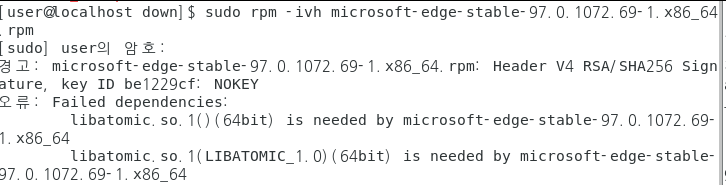
error 56

Ubuntu CPU-X AppImage execution : libfuse.so.2 error

~$ ./CPU-X-4.5.3-x86_64.AppImage dlopen(): error loading libfuse.so.2AppImages require FUSE to run. You might still be able to extract the contents of this AppImage if you run it with the --appimage-extract option. See https://github.com/AppImage/AppImageKit/wiki/FUSE for more information~$ sudo apt install libfuse2[sudo] gangserver 암호: 패키지 목록을 읽는 중입니다... 완료의존성 트리를 만드는 중입니다... 완료상태 정보를 읽는 중입니다....

OS/Ubuntu 2023.09.02

Raspberry Pi - ImportError: libf77blas.so.3: cannot open shared object file: No such file or directory

[ Error message ]ImportError: libf77blas.so.3: cannot open shared object file: No such file or directory [ Solution ]- Install libatlas-base-dev$ sudo apt install libatlas-base-dev [ Python ]gangserver@raspberrypi:~/devel/pydev $ python BreamAndSmelt.pyTraceback (most recent call last): File "/home/gangserver/devel/pydev/BreamAndSmelt.py", line 35, in from sklearn.neighbors import KNeighbo..

개발/Python 2023.05.04

error loading libfuse.so.2

$ ./Vrew-0.13.24-x86_64.AppImage dlopen(): error loading libfuse.so.2AppImages require FUSE to run. You might still be able to extract the contents of this AppImage if you run it with the --appimage-extract option. See https://github.com/AppImage/AppImageKit/wiki/FUSE for more information => libfuse2 install$ sudo apt install libfuse2[sudo] gangserver 암호: 패키지 목록을 읽는 중입니다... 완료의존성 트리를 만드는 중입니다.....

OS/Ubuntu 2023.02.28
728x90
반응형