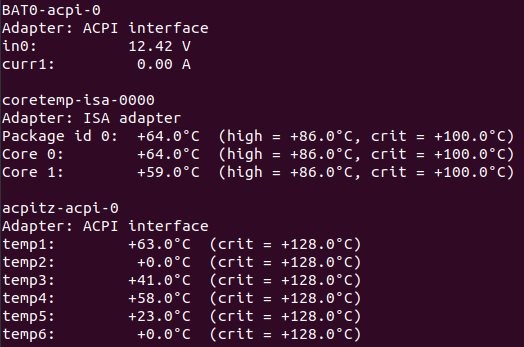
Ubuntu CPU 온도 체크 프로그램 1. lm-sensors 1.1 설치$ sudo apt install lm-sensors 1.2 센서 검색$ sudo sensors-detect 1.3 실행$ sensors 1.4 삭제$ sudo apt remove lm-sensors 2. xsensors 2.1 설치$ sudo apt install xsensors 2.2 실행$ xsensors 2.3 삭제$ sudo apt remove xsensors OS/Ubuntu 2021.03.29
Ubuntu Raspberry Pi Imager Install / Uninstall 1. Install$ sudo apt install rpi-imager 2. Uninstall$ sudo apt remove rpi-imager OS/Ubuntu 2020.11.04
Ubuntu Intel graphics driver install 1. VGA driver found1.1 lspciuser@localhost:~$ lspci | grep VGA00:02.0 VGA compatible controller: Intel Corporation Xeon E3-1200 v3/4th Gen Core Processor Integrated Graphics Controller (rev 06) 1.2 inxi (sudo apt install inxi)user@localhost:~$ inxi -GGraphics: Device-1: Intel Xeon E3-1200 v3/4th Gen Core Processor Integrated Graphics driver: i915 v: kernel Display: x11 server: X.Org 1.20.1.. OS/Ubuntu 2020.10.19
Ubuntu 20.04 + VMware Workstation Player 16.x 1. Download VMware Workstation Player 16.x https://www.vmware.com/go/getplayer-linux (Download link) Download file name : VMware-Player-16.0.0-16894299.x86_64.bundle VMware Workstation Player 16.x download page > Try Workstation 15.5 Player for Linux > Download Now >> https://www.vmware.com/products/workstation-player/workstation-player-evaluation.html (EN) > LinuxLinux용 Works.. OS/Ubuntu 2020.10.14
Sublime Text 3 Install (Ubuntu) 1. Install the GPG key$ wget -qO - https://download.sublimetext.com/sublimehq-pub.gpg | sudo apt-key add - 2. Ensure apt is set up to work with https sources:$ sudo apt install apt-transport-https 3. Select the channel to use:Stableecho "deb https://download.sublimetext.com/ apt/stable/" | sudo tee /etc/apt/sources.list.d/sublime-text.list 4. Update apt sources and install Sublime Text$ sud.. OS/Ubuntu 2020.09.24
IntelliJ 단축키(Shortcuts) (Ubuntu) Intellij Top 15 단축키(Shortcuts)1. Alt + Enter : 오류 수정(제안 선택) * Alt + Shift + Enter : 첫번째 제안 적용2. F2 : 에디터에서 오류와 경고 사이 이동3. Alt + 1 : 프로젝트창 열고 포커스(Project View)4. ESC : 에디터 포커스5. Ctrl + E : 최근 실행했던 파일 확인(Recent Files)6. Ctrl + B : 선언으로 이동 * Ctrl + Alt + B : 구현으로 이동7. Alt + F7 : 어떤 항목이 사용된 위치 검색8. Double Ctrl : 실행9. Ctrl + W, Ctrl + Sh.. OS/Ubuntu 2020.09.23
Ubuntu 20.04 ifconfig install $ sudo apt install net-tools ----------------------------------------------------------------------------$ ifconfigCommand 'ifconfig' not found, but can be installed with:sudo apt install net-tools---------------------------------------------------------------------------- OS/Ubuntu 2020.08.11
Ubuntu 20.04 MariaDB Install $ sudo apt install mariadb-server $ sudo mysql_secure_installation DB/MariaDB 2020.08.11
Ubuntu VMware Workstation Player 15.x re-configure $ sudo vmware-modconfig --console --install-all https://kb.vmware.com/s/article/1002411 VMware Workstation stops functioning after updating the kernel on a Linux hostAdditional Information In Workstation 7.x and later, it is possible to re-configure without launching Workstation. Run this command, after upgrading the kernel: vmware-modconfig --console --install-all The --console switch tells Wo.. OS/Ubuntu 2020.06.02
VMware Workstation Player 15.x Execution Command $ /usr/bin/vmplayerVM Workstation Player UI -> Open a Virtual Machine or $ /usr/bin/vmplayer /path/to/VM's .vmx fileex) $ /usr/bin/vmplayer /home/user/vm/Windows7.vmx https://communities.vmware.com/thread/578176 OS/Ubuntu 2020.06.02